 Isaac Bythewood
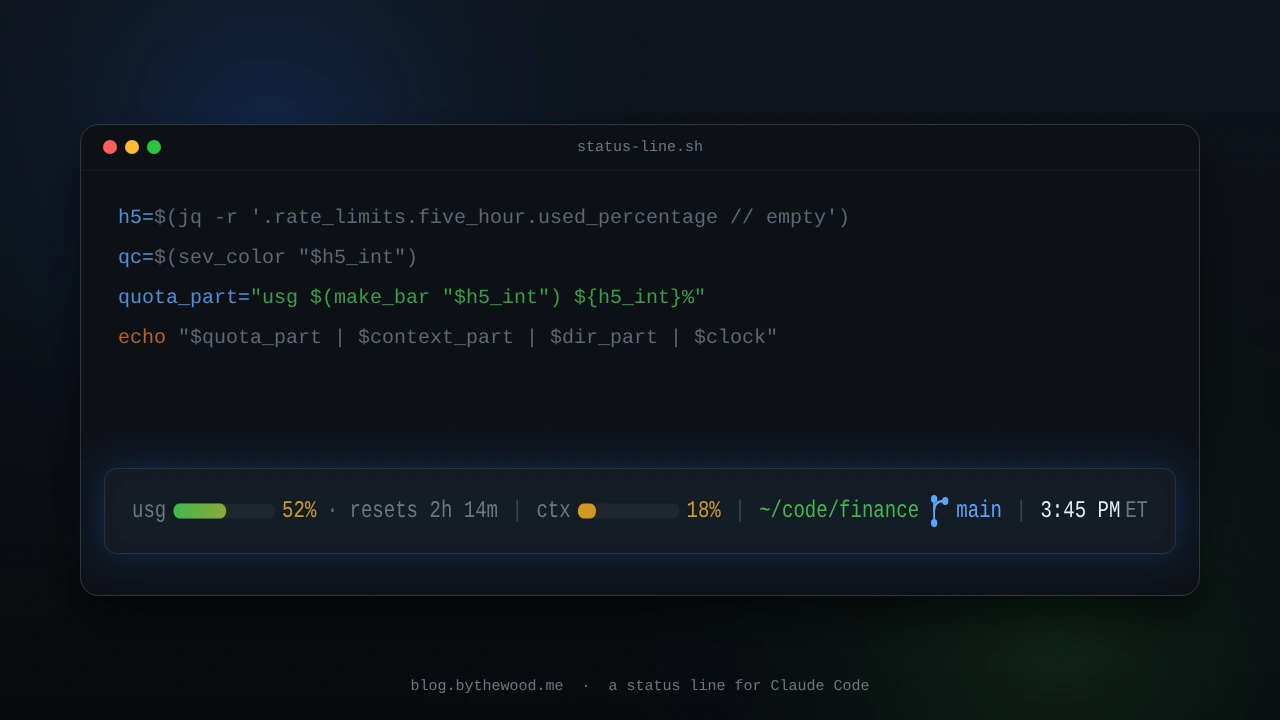
Claude Code lets you swap the bar at the bottom of the terminal out for any script you want, so it pipes a blob of JSON to your script on stdin and whatever you print back becomes the status line. Here's the one I put together this week:
usg ▓▓▓▓▓░░░░░ 52% · resets 2h 14m | ctx ▓▓░░░░░░░░ 18% | ~/code/finance main | 3:45 PM ET
That's the usage quota, the context window, where I am along with the git branch, and the time, and it's all one bash file with no API calls and nothing running in the background.
The file
Save this as ~/.claude/status-line.sh:
#!/bin/bash
# Claude Code status line. Reads the status-line JSON on stdin, prints one line.
# Requires: bash, jq, git, date.

input=$(cat)

cwd=$(echo "$input" | jq -r '.workspace.current_dir // .cwd // empty')
[ -z "$cwd" ] && cwd="$PWD"

YELLOW=$'\033[93m'; GREEN=$'\033[92m'; BLUE=$'\033[96m'
RED=$'\033[91m'; DIM=$'\033[90m'; RESET=$'\033[0m'

make_bar() {  # <pct> -> 10-cell ▓/░ bar, one filled cell per 10%
    local p="$1" filled empty i out=""
    [ "$p" -lt 0 ] && p=0
    filled=$(( p / 10 )); [ "$filled" -gt 10 ] && filled=10
    empty=$(( 10 - filled ))
    i=0; while [ $i -lt $filled ]; do out="${out}▓"; i=$(( i + 1 )); done
    i=0; while [ $i -lt $empty ]; do out="${out}░"; i=$(( i + 1 )); done
    printf '%s' "$out"
}
sev_color() {  # green < 50% <= yellow < 80% <= red
    local p="$1"
    if   [ "$p" -ge 80 ]; then printf '%s' "$RED"
    elif [ "$p" -ge 50 ]; then printf '%s' "$YELLOW"
    else printf '%s' "$GREEN"; fi
}

# Context window bar
used_pct=$(echo "$input" | jq -r '.context_window.used_percentage // empty')
if [ -n "$used_pct" ]; then
    pct_int=$(printf "%.0f" "$used_pct")
    context_part="${DIM}ctx${RESET} ${YELLOW}$(make_bar "$pct_int") ${pct_int}%${RESET}"
else
    context_part="${DIM}ctx${RESET} ${YELLOW}░░░░░░░░░░ 0%${RESET}"
fi

# Working directory (home collapsed to ~) + git branch
display_dir=$(echo "$cwd" | sed "s|^$HOME|~|")
branch_part=""
if git -C "$cwd" -c core.fsmonitor= rev-parse --git-dir >/dev/null 2>&1; then
    branch=$(git -C "$cwd" -c core.fsmonitor= symbolic-ref --short HEAD 2>/dev/null \
             || git -C "$cwd" -c core.fsmonitor= rev-parse --short HEAD 2>/dev/null)
    if [ -n "$branch" ]; then
        branch_icon=$(printf '\xee\x82\xa0')  # Nerd Font branch glyph
        branch_part=" ${BLUE}${branch_icon} ${branch}${RESET}"
    fi
fi

# 5-hour usage quota (Pro/Max only), severity-colored, with a reset countdown
quota_part=""
h5=$(echo "$input" | jq -r '.rate_limits.five_hour.used_percentage // empty')
if [ -n "$h5" ]; then
    h5_int=$(printf '%.0f' "$h5")
    quota_part="${DIM}usg${RESET} $(sev_color "$h5_int")$(make_bar "$h5_int") ${h5_int}%${RESET}"
    reset_at=$(echo "$input" | jq -r '.rate_limits.five_hour.resets_at // empty')
    if [ -n "$reset_at" ]; then
        left=$(( reset_at - $(date +%s) )); [ "$left" -lt 0 ] && left=0
        h=$(( left / 3600 )); m=$(( (left % 3600) / 60 ))
        if [ "$h" -gt 0 ]; then eta="${h}h ${m}m"; else eta="${m}m"; fi
        quota_part="${quota_part} ${DIM}· resets ${eta}${RESET}"
    fi
fi

# Clock, pinned to Eastern regardless of the system clock
clock=$(TZ="America/New_York" date '+%-I:%M %p')

# Assemble: usg | ctx | cwd+branch | clock. Usage is skipped until its data exists.
SEP=" ${DIM}|${RESET} "
line="${context_part}${SEP}${GREEN}${display_dir}${RESET}${branch_part}${SEP}${clock} ET"
[ -n "$quota_part" ] && line="${quota_part}${SEP}${line}"
echo "$line"
Hook it up
You'll need jq installed and a Nerd Font in your terminal for the branch glyph, then you can add this to ~/.claude/settings.json:
"statusLine": {
  "type": "command",
  "command": "bash ~/.claude/status-line.sh"
}
That's the whole integration, Claude Code runs the command, feeds it JSON, and renders whatever you print.
How it works
On every render Claude Code hands your script a JSON object on stdin. The fields here are pulled out with jq and every one of them ends in // empty so that a missing field just drops its segment instead of printing null, which matters because some of the fields show up late. Context usage only appears once a turn has run, and the rate_limits block only exists on Pro/Max plans after the first API response.
The four segments, going left to right:
usgis the one I actually wanted out of all this.rate_limits.five_hour.used_percentageis the same number/usageshows and it costs you no extra requests, andresets_atis a Unix timestamp so the countdown is justresets_at - now. The bar goes green, then yellow past 50%, then red past 80%.ctxiscontext_window.used_percentage, which is how full the context window is. I left it plain yellow since it's really just informational.- cwd + branch uses
git symbolic-reffor the branch name and falls back to a short commit hash on a detached HEAD. The-c core.fsmonitor=is there to keep this constant polling from fighting a real git operation in the same repo over the fsmonitor lock. - clock is hard-pinned to
America/New_York, which tracks the EST/EDT switch on its own. The one thing to watch out for is that the status line refreshes on Claude Code events rather than on a timer, so the clock can sit still while you're idle. You can add"refreshInterval": 10to the config if you want it ticking along.
The full JSON schema, including the fields I skipped over like session cost, is in the statusLine docs if you want to add more to yours.