 Isaac Bythewood
I ran webpack on every Django project I had for years and over that time the config kept growing, the builds kept getting slower, and the plugin churn never really stopped. In 2026 I use Vite instead and the integration with Django is thin enough that I don't bother with a wrapper package at all. The vite.config.js is a single file, Django just sees regular static files, and {% static %} works the way it always has.
I use this on analytics and status so most of the snippets below are pulled straight out of those two projects.
Why I moved off webpack
There were a few reasons for that:
- It's slow, and Vite's dev server doesn't bundle in development at all, it serves source modules over native ESM. The Mews team cut their builds 80% by switching to Rspack, and GitLab's move to Rolldown-Vite took their builds from 2.5 minutes to 22 seconds.
- The config is verbose, since a reasonable webpack setup wants
babel-loader,css-loader,style-loader,mini-css-extract-plugin,postcss-loader,sass-loader, andHtmlWebpackPluginbefore you've written a line of app code. Vite ships TypeScript, JSX, CSS, SCSS, and HMR built in and myvite.config.jsis 30 lines. - The energy is mostly elsewhere now, the State of JavaScript 2025 survey put webpack at 86% usage and 14% retention, and the new work is going into Vite, esbuild, Rolldown, and Rspack.
- Webpack itself moves pretty slowly these days, there's a public 2026 roadmap but no v6 release on the horizon that I can see. The Hacker News thread "It's 2026 now. Is webpack 6.x going to happen?" is a good read.
If you're on a giant webpack codebase and a full migration sounds like too much, Rspack is a Rust-based drop-in replacement that works with most webpack configs as-is. For a Django project I'd skip the middle step and go straight to Vite.
The Vite config
Each Django app has a static_src/index.js that imports its own SCSS and scripts, and Vite takes those entry points and writes the bundle out to a single static/ directory inside the project's main app. This is the vite.config.js straight out of analytics:
import { resolve } from "path";
import { defineConfig } from "vite";

export default defineConfig({
  base: "/static/",
  build: {
    outDir: resolve(__dirname, "analytics/static"),
    emptyOutDir: true,
    rollupOptions: {
      input: {
        base: resolve(__dirname, "analytics/static_src/index.js"),
        pages: resolve(__dirname, "pages/static_src/index.js"),
        properties: resolve(__dirname, "properties/static_src/index.js"),
        collector: resolve(__dirname, "collector/static_src/index.js"),
      },
      output: {
        entryFileNames: "[name].js",
        assetFileNames: (assetInfo) => {
          if (/\.(png|jpg|gif|svg|webp)$/.test(assetInfo.name)) {
            return "images/[name][extname]";
          }
          return "[name][extname]";
        },
      },
    },
  },
  css: {
    preprocessorOptions: {
      scss: { quietDeps: true },
    },
  },
});
A few notes:
base: "/static/"matches Django'sSTATIC_URL, so anything Vite writes into the bundle (image references, font URLs) resolves against the same path Django serves from.- Each Django app gets its own entry under
rollupOptions.input. Vite emits abase.js,pages.js,properties.js, andcollector.jsinto the same output folder and templates load whichever they need. entryFileNames: "[name].js"keeps the output names predictable, and WhiteNoise hashes them atcollectstatictime anyway so I don't need Vite doing it too.emptyOutDir: truewipes the output between builds, since Vite refuses to clean a directory outside its project root unless you set it, and without it you get a warning every build and stale files pile up.
Django settings
I don't use django-vite or any other integration package because Django doesn't really need to know that Vite exists, it just sees a static directory full of pre-built files and serves them.
# settings.py

STATIC_URL = "static/"
STATICFILES_STORAGE = "whitenoise.storage.CompressedManifestStaticFilesStorage"
STATICFILES_DIRS = (BASE_DIR / "analytics/static",)
STATIC_ROOT = BASE_DIR / "static"

MIDDLEWARE = [
    "django.middleware.security.SecurityMiddleware",
    "whitenoise.middleware.WhiteNoiseMiddleware",
    # ...
]
STATICFILES_DIRS points at Vite's output directory so collectstatic and the dev server both pick it up, and CompressedManifestStaticFilesStorage hashes every file during collectstatic and rewrites the references in CSS to point at the hashed names. Don't append ?v=... query strings to {% static %} though, WhiteNoise expects to control those URLs and the manifest will get out of sync on you.
The templates stay about as plain as they ever were:
<link href="{% static 'base.css' %}" rel="stylesheet">
<script type="module" src="{% static 'base.js' %}"></script>
In dev that resolves to /static/base.css and in production WhiteNoise rewrites it to /static/base.abc123.css for you automatically.
Running Django and Vite together
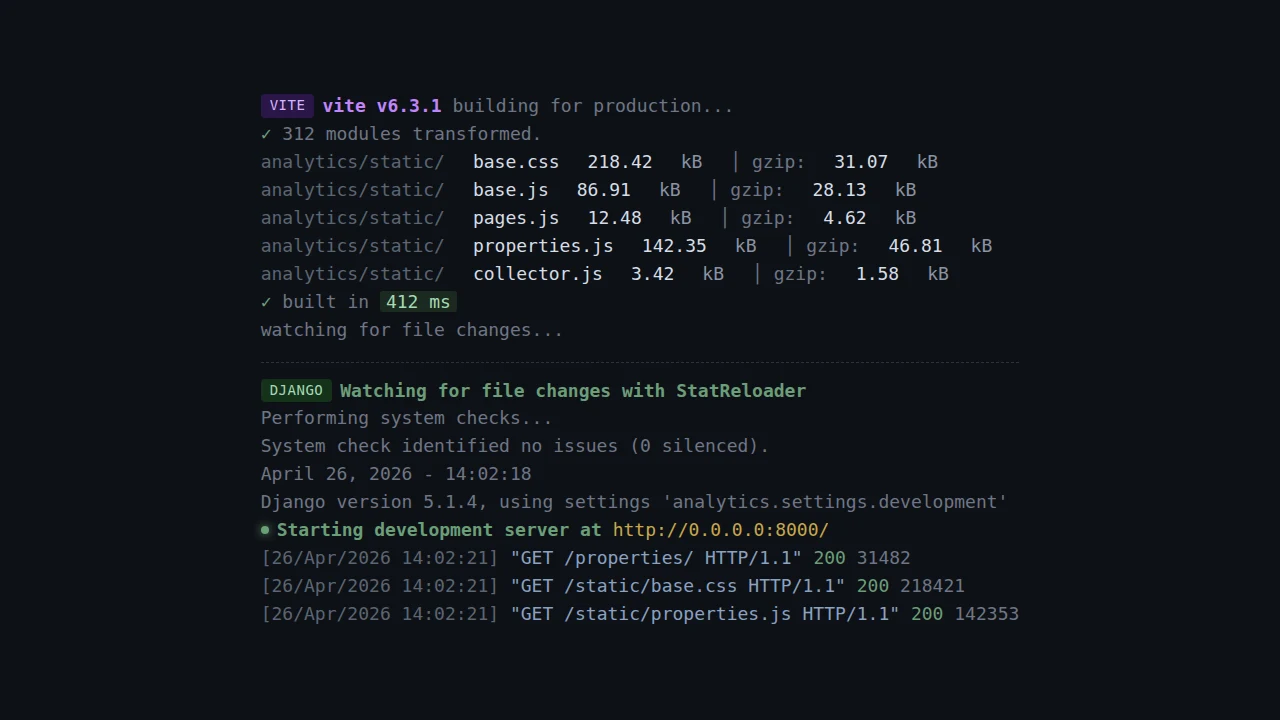
Vite has a watch mode that rebuilds on every change and I run it right next to Django's runserver out of a Makefile:
.PHONY: run runserver vite

run: install
	${MAKE} -j2 runserver vite

runserver:
	uv run python manage.py runserver 0.0.0.0:8000

vite:
	bun run dev
make -j2 runs both targets in parallel in the same terminal, and the dev script in package.json is just vite build --watch:
{
  "scripts": {
    "dev": "vite build --watch",
    "build": "vite build"
  }
}
I don't use Vite's dev server myself. It's great for SPAs but on a Jinja-rendered page HMR doesn't really do much of anything for you and you've added an extra port and an integration layer to get it. vite build --watch just writes plain files to disk that look identical to what production serves, so I hard refresh in the browser the same way I always did with webpack.
If you really want HMR then django-vite is the package most people reach for and it works well, you can use it if you want! I just don't think it's worth the extra dependency on a multi-page app.
Per-app static_src
For the analytics dashboard the entry point looks like:
// properties/static_src/index.js
import "./scripts/property_graphs.js";
import "./scripts/property_map.js";
import "./scripts/property_date_select.js";
import "./scripts/property_filters.js";

import "./styles/print.scss";
And in the dashboard template:
{% block extra_js %}
<script type="module" src="{% static 'properties.js' %}"></script>
{% endblock %}
New JS for an app goes in that app's static_src/ and shows up as <app-name>.js in the static directory, with no webpack chunks config, no splitChunks, and no Babel preset to keep current.
Production
The Dockerfile runs bun run build once during the image build and then collectstatic, and after that there's no Node or Vite at runtime at all, just Gunicorn serving Django and WhiteNoise serving the hashed files.
RUN bun install --frozen-lockfile
RUN bun run build
RUN uv run python manage.py collectstatic --noinput
Total build time across bun install, vite build, and collectstatic is under 30 seconds on these projects, where webpack used to take three or four minutes to do the same work.
Sources
Honza Hrubý's "Goodbye Webpack, Hello Rspack" is the case for the drop-in path if a full migration isn't realistic. Ratchapol Thaworn's "Migrating from Webpack to Vite" and HK Lee's "Vite vs. Webpack in 2026" go further on the Vite side. The Vite docs and the django-vite README are the references I keep open when I'm actually wiring it up. Saas Pegasus has a longer Django + Vite walkthrough too if you want one with React and Tailwind on top.
Webpack served me well for a long time, I just don't have much of a reason to keep using it on anything new.